1. how might the metaphor of an ‘ecology’ impact on the way you think about, understand or use the Internet?
When we think about the term ecology we think about the terms environment, evolution and interaction. Each of these terms can be related to the internet and help us understand that the internet is an environment of its own which enhances and encourages interaction and is constantly evolving and developing.
2. how are the concepts ‘information’ and ‘communication’ understood within the framework of an ‘information ecology’?
The concepts of information and communication come hand-in-hand with one another. Without communication there would be no information and vicaversa. However within the framework of an information ecology there is the notion that we are beginning to delve into a period where we are experiencing an information overload. In turn this is affecting the way in which we communicate.
3. why don’t we talk of a ‘communication ecology’?
We can not talk about a communication ecology simply because communication is something natural and that will always continue to exist and grow. Communication is also a tool rather than an outcome and this is why we refer to an information ecology rather than a communication ecology.
Wednesday, October 29, 2008

Saturday, October 25, 2008
Module 4: Evaluating the Web
My chosen source is:
1. Surfing Australia
Annotation:
Surfing Australia is an extremely comprehensive website with pages containing information on competitions, surfing news, surfing reports, surf break ratings and much more. Although the website contains all of this information it is mostly presenting information on past, current and future surfing competitions and events. They provide winners tallies and graphs as well as trophy winners. It is written in a journalistic style way however they aren't so fussed about the use of slang as most surfers understand that language. It is well researched and well written and extremely easy to read and pull information from.
TASK:
1. in terms of your own future use, which 'body ' of information (ie. the original 'snapshot' of the site, or your own, annotated, analytical version) would be most useful to refer back to?
I think my own annotation will be more useful to look back on and refer to because it contains my own point of view. This makes it easier to refer to in my work.
2. In term of external users (i.e. if you included this site as a hyperlink or resource on a website) which body of information would best help them judge if the site was useful or of interest to them?
In terms of external users I believe that the original information would be more useful to them. This is because the original piece of writing isn't written with any bias. Where as mine contains bias because of my point of view towards the topic.
1. Surfing Australia
Annotation:
Surfing Australia is an extremely comprehensive website with pages containing information on competitions, surfing news, surfing reports, surf break ratings and much more. Although the website contains all of this information it is mostly presenting information on past, current and future surfing competitions and events. They provide winners tallies and graphs as well as trophy winners. It is written in a journalistic style way however they aren't so fussed about the use of slang as most surfers understand that language. It is well researched and well written and extremely easy to read and pull information from.
TASK:
1. in terms of your own future use, which 'body ' of information (ie. the original 'snapshot' of the site, or your own, annotated, analytical version) would be most useful to refer back to?
I think my own annotation will be more useful to look back on and refer to because it contains my own point of view. This makes it easier to refer to in my work.
2. In term of external users (i.e. if you included this site as a hyperlink or resource on a website) which body of information would best help them judge if the site was useful or of interest to them?
In terms of external users I believe that the original information would be more useful to them. This is because the original piece of writing isn't written with any bias. Where as mine contains bias because of my point of view towards the topic.
Module 4: Organising search information task
1. Surfing Australia
URL: http://www.surfingaustralia.com
Author: Surfing Australia (esie Solutions)
Institution: International Surfing Association
Abstract:
National governing body for the sport of Surfing in Australia. Recognised by the Australian Sports Commission and a member of the International Surfing Association [World Governing Body]representing Australia and a recognised federation of the Australian Olympic Committee.
Works to further the interests of surfers in the area of organisation, education, competition and environment in Australia.
2. Surfing-waves
URL: http://www.surfing-waves.com/
Author: Surfing-Waves.com.
Institution: Surfing-Waves.com
Abstract:
Your guide to the the wonderful world of surfing the waves. If you are interested in the sport of surfing and want to find out information on learning to surf, waves, surf reports, surf videos, surfing equipment. surfboards and accessories then you have come to the right place. Join the SW community today and be ready for the dawn patrol tomorrow.
2. Surf World
URL: http://www.surfworld.org.au/
Author:
Institution: Surfing Australia
Abstract:
Surf World is recognised as the world's largest Surfing – Beach Culture Museum and houses the Australian Surfing Hall Of Fame as part of its comprehensive surfing displays.
URL: http://www.surfingaustralia.com
Author: Surfing Australia (esie Solutions)
Institution: International Surfing Association
Abstract:
National governing body for the sport of Surfing in Australia. Recognised by the Australian Sports Commission and a member of the International Surfing Association [World Governing Body]representing Australia and a recognised federation of the Australian Olympic Committee.
Works to further the interests of surfers in the area of organisation, education, competition and environment in Australia.
2. Surfing-waves
URL: http://www.surfing-waves.com/
Author: Surfing-Waves.com.
Institution: Surfing-Waves.com
Abstract:
Your guide to the the wonderful world of surfing the waves. If you are interested in the sport of surfing and want to find out information on learning to surf, waves, surf reports, surf videos, surfing equipment. surfboards and accessories then you have come to the right place. Join the SW community today and be ready for the dawn patrol tomorrow.
2. Surf World
URL: http://www.surfworld.org.au/
Author:
Institution: Surfing Australia
Abstract:
Surf World is recognised as the world's largest Surfing – Beach Culture Museum and houses the Australian Surfing Hall Of Fame as part of its comprehensive surfing displays.
First opened in December 1993, an initiative of Surfing Australia, Surfworld was recognised in 1994 as one of “The most significant centres of world surfing heritage” by the International Surfing Association.
Module 4: Boolean searching task
The biggest number of hits relating to these key words:
If I want to get a bigger search result i simply put AND between my search terms. In my example I did "surfing AND Australia" and i was given a result of 9,680,000 as aposed to 541,000 which I got from searching for "surfing Australia".
Information most relevant to what you ACTUALLY wanted to look for!:
To do this you add the word NOT. For example my search came up with some results that included waveskiing. Therefore to narrow my search i search "surfing Australia NOT waveskii".
Information coming only from university source:
To find information only from university sources i type "edu" at the end of my search. For example I would type "surfing Australia edu".
If I want to get a bigger search result i simply put AND between my search terms. In my example I did "surfing AND Australia" and i was given a result of 9,680,000 as aposed to 541,000 which I got from searching for "surfing Australia".
Information most relevant to what you ACTUALLY wanted to look for!:
To do this you add the word NOT. For example my search came up with some results that included waveskiing. Therefore to narrow my search i search "surfing Australia NOT waveskii".
Information coming only from university source:
To find information only from university sources i type "edu" at the end of my search. For example I would type "surfing Australia edu".
1. Choose your most commonly used internet search engine and do a search with words of your choosing.
For my search I chose the keywords "surfing Australia". When I searched for this in Google it came up with 541,000 results. The first 5 hits from this search were:
www.surfingaustralia.com/ - 23k - Cached - Similar pages - Note this
For my search I chose the keywords "surfing Australia". When I searched for this in Google it came up with 541,000 results. The first 5 hits from this search were:
Surfing Australia
Portal of information about the sport of surfing. Find upcoming events, clubs and membership, photo gallery, coaching, video downloads and contact details.www.surfingaustralia.com/ - 23k - Cached - Similar pages - Note this
Surfing Australia
Surfing Victoria Surfing Australia Homepage Surfing Victoria is recognised by the State Government as the organising body for surfing in Victoria. ...
www.surfingaustralia.com/school.aspx?org=450 - 21k - Cached - Similar pages - Note this
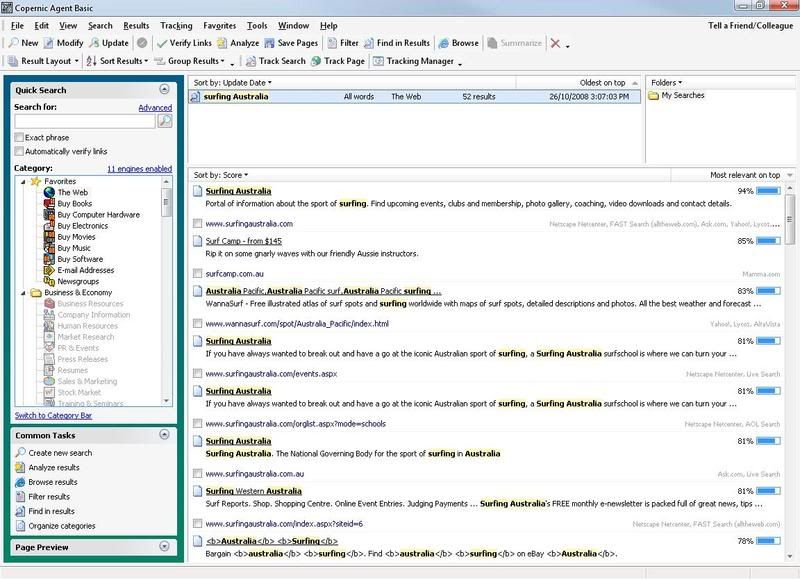
Again i searched for the term "surfing Australia". However this time i was only presented with 56 results. I dont really see the point of using this program as it gives fewer results and the results that were given arent that good. I found that Googles results were a lot better on first glance because they provided not only websites but also a huge archive of images. The first 5 hits here were:
www.surfingaustralia.com/school.aspx?org=450 - 21k - Cached - Similar pages - Note this
Waveski Surfing Australia Home
It is provided by Waveski Surfing Australia Inc., the national association for the sport in Australia and will be regularly updated with stories and news on ...
www.waveskisurfingaust.com/ - 43k - Cached - Similar pages - Note this
2. Using copernicus or similar, set it up to search at least three search engines (including one that will search the 'deep web') and repeat eactly the same search.www.waveskisurfingaust.com/ - 43k - Cached - Similar pages - Note this
Surfing Australia
Surfing in Australia, the best surf spots and areas on the East, South and West Coast.
www.surfing-waves.com/travel/australia.htm - 29k - Cached - Similar pages - Note this
www.surfing-waves.com/travel/australia.htm - 29k - Cached - Similar pages - Note this
Australia Surfing Australia surf travel guide atlas with spot ...
Surfing Australia surfing and travel guide of Australia by GlobalSurfers with surf forecasts and other travel info for surfers.
www.globalsurfers.com/country_details.cfm?land=Australia - 39k - Cached - Similar pages - Note this
www.globalsurfers.com/country_details.cfm?land=Australia - 39k - Cached - Similar pages - Note this
Again i searched for the term "surfing Australia". However this time i was only presented with 56 results. I dont really see the point of using this program as it gives fewer results and the results that were given arent that good. I found that Googles results were a lot better on first glance because they provided not only websites but also a huge archive of images. The first 5 hits here were:

Module 4: Downloading tools / plug-ins Task
1. Adobe pdf reader: This file is extremely important into todays times. There are a lot of files out there now which are in pdf format and this is the only program, to my knowledge, which lets you view pdf files. It is available for free download and very useful.
2. Shockwave/flash player: This program lets you view rich-media files. Shockwave in particular is used a lot in free online mini games. Miniclip.com is a perfect example of shockwave and flash use as most of their content uses these programs. They can also be used to view animations and interective content.
3. windows media player: Windows media player is a really well thoughtout program. I allows users to listen to music, watch videos, steam live video and audio and listen to live raido podcasts. If used in conjunction with DivX you can even watch DVD's in a really nice quality.
4. Pagesucker: Pagesucker seems like a great progam. It allows the user to download files from the web while offline. However the free trial version only lasts for 15 days.
2. Shockwave/flash player: This program lets you view rich-media files. Shockwave in particular is used a lot in free online mini games. Miniclip.com is a perfect example of shockwave and flash use as most of their content uses these programs. They can also be used to view animations and interective content.
3. windows media player: Windows media player is a really well thoughtout program. I allows users to listen to music, watch videos, steam live video and audio and listen to live raido podcasts. If used in conjunction with DivX you can even watch DVD's in a really nice quality.
4. Pagesucker: Pagesucker seems like a great progam. It allows the user to download files from the web while offline. However the free trial version only lasts for 15 days.
Module 3: Web 2.0
There are many differences between the web 2.0 and the html version of the web. It is clearly noticeable that the web 2.0 has bought about some really nice features however they do come at a cost sometimes. The web 2.0 has added such things as formating, layouts, graphical interfaces and a more complex way of using the internet. These features however have forced us to develop faster internet services which are more expensive and which some people can not keep up with.
With the introduction of youtube and myspace, which both stream videos and allow users to upload their own photos, it is becoming increasingly important for users to spend more money on their ISP services. This is one of the major downfalls of the web 2.0.
Html on the other hand is simple and uses up very little resources. Most pages are simple and text based. However html also has a downfall and this is the layout. There is often no clear layout when looking at html pages. This makes them hard to read and unclear at times.
Personally i prefer the web 2.0 and the features it has bought about. The internet would be a pretty boring place if it wasnt for the likes of youtube, myspace and facebook which bring a whole new meaning and a whole new level of networking to the world.
With the introduction of youtube and myspace, which both stream videos and allow users to upload their own photos, it is becoming increasingly important for users to spend more money on their ISP services. This is one of the major downfalls of the web 2.0.
Html on the other hand is simple and uses up very little resources. Most pages are simple and text based. However html also has a downfall and this is the layout. There is often no clear layout when looking at html pages. This makes them hard to read and unclear at times.
Personally i prefer the web 2.0 and the features it has bought about. The internet would be a pretty boring place if it wasnt for the likes of youtube, myspace and facebook which bring a whole new meaning and a whole new level of networking to the world.
Module 3: Blogging
So far I am enjoying blogging quite a lot. When I start this course I had had very little experience with blogging and I didnt know what all of the fuss was about. However after blogging for the last 4 or so months I have come to enjoy it greatly. I have also found that its hard not to start looking around the internet for other peoples blogs once you've started blogging yourself. I was amazed to see that blogging wasnt only used for personal thoughts but for many other things.
Blogs can be used for a whole number of reasons. There are music blogs, celebrity gossip blogs, campaining blogs, personal blogs, food blogs, seasonal blogs and many more. It is also interesting to note that there are thousands of people which look at these particular blogs daily. Since blogging and looking around the internet for other blogs I have found myself frequenting music blogs which often allow downloads to new music or just share general information about new music. This sort of blog is very popular. Another popular blogging topic is celebrity gossip. There are many blogs on the internet aimed at celebrity gossip and these blogs generaly have the largest following.
I think that after i've finished this course I will continue to blog well into the future.
Blogs can be used for a whole number of reasons. There are music blogs, celebrity gossip blogs, campaining blogs, personal blogs, food blogs, seasonal blogs and many more. It is also interesting to note that there are thousands of people which look at these particular blogs daily. Since blogging and looking around the internet for other blogs I have found myself frequenting music blogs which often allow downloads to new music or just share general information about new music. This sort of blog is very popular. Another popular blogging topic is celebrity gossip. There are many blogs on the internet aimed at celebrity gossip and these blogs generaly have the largest following.
I think that after i've finished this course I will continue to blog well into the future.
Module 3: Legal Issues
Have you used images or words on your web page or website that contravene copyright laws?
All of the images I used on my website we're property of me. This means that i did not contravene and copyright laws.
Would you be in breach of copyright if you put the Curtin logo at the top of your web page for an assignment?
I think that if i was to use a curtin logo I would have to reference the image at the end of my page. Also I'm not completely sure but for some reason I am thinking that you dont need to reference governement images. However I will look into this further and write back.
All of the images I used on my website we're property of me. This means that i did not contravene and copyright laws.
Would you be in breach of copyright if you put the Curtin logo at the top of your web page for an assignment?
I think that if i was to use a curtin logo I would have to reference the image at the end of my page. Also I'm not completely sure but for some reason I am thinking that you dont need to reference governement images. However I will look into this further and write back.
Module 3: Standards Task
These are my 5 most important rules when writing online:
1. Lists are more effective than large paragraphs. Someone is more likely to read a list rather than a wall of text.
2. Don't stray away from the topic at hand. Say what you have to say and get out of there.
3. Titles are an effective way to gain the attention of readers. Make your titles bold and eye capturing. Be creative and don't be afraid to say it how it is.
4. If you're writing for a wide audience make sure you use language that you know everyone will be able to understand. This will attract more readers in the long run.
5. Keep you page tidy. No one likes a badly layed out page. Remember to use proper punctuation, paragraphing and etiquette.
1. Lists are more effective than large paragraphs. Someone is more likely to read a list rather than a wall of text.
2. Don't stray away from the topic at hand. Say what you have to say and get out of there.
3. Titles are an effective way to gain the attention of readers. Make your titles bold and eye capturing. Be creative and don't be afraid to say it how it is.
4. If you're writing for a wide audience make sure you use language that you know everyone will be able to understand. This will attract more readers in the long run.
5. Keep you page tidy. No one likes a badly layed out page. Remember to use proper punctuation, paragraphing and etiquette.
Module 3: HTML Task
After an hour or so of tutorials I have final made a pretty basic looking website. This task was basically a refresher for me because I took a webpage design class in year 10. To my surprise I still remembered a lot from those classes which helped a lot. So i guess I am pretty proud of myself, not for making the webpage, but because I remembered a lot of the stuff that I had been taught in school which was 5 years ago now.
The major differences between html and blogging are pretty clear. Blogging is pretty straight forward and user friendly. You dont have to use tags etc to change the font style, size, colour, spacing etc in a blog. However when using html you have to type in exactly what you want to happen. I dont really prefer one over the other necessarily. I guess it depends on what sort of mood I am in. If i was feeling creative I would prefer to use html because it allows the user to customize the page exactly how they want it. Html has very little limitation. If i was feeling lazy I guess I would find myself writing up on a blog because its much easier and less time consuming.
I enjoyed this particular task a lot.
The major differences between html and blogging are pretty clear. Blogging is pretty straight forward and user friendly. You dont have to use tags etc to change the font style, size, colour, spacing etc in a blog. However when using html you have to type in exactly what you want to happen. I dont really prefer one over the other necessarily. I guess it depends on what sort of mood I am in. If i was feeling creative I would prefer to use html because it allows the user to customize the page exactly how they want it. Html has very little limitation. If i was feeling lazy I guess I would find myself writing up on a blog because its much easier and less time consuming.
I enjoyed this particular task a lot.
Module 2: Chat Task
On the 3/09/08 I participated in an msn chat with Annette, Bianca, Diva and Maggie. The conversation was quite slow to start off with. However we soon began to develop our discussion and proceeded to talk about spyware, our favorite messenger program, internet usuage allowance at university and viruses. Everyone concluded that their favorite messenger was MSN now known as Windows Live Messenger. However soon we found out that Annette used MSN PLUS. From my previous experiences with MSN PLUS I had found that it contained an optional piece of software which contained spyware. And soon enough our chat moved to the topic of spyware. We covered a number of different ways to rid your computer of spyware. This included programs such as spyware search and destroy. After our long discussion about spyware we then moved on to features we looked for in a messenger.
The common features we all looked for in messengers were videocalling functionality, custom emoticons, file sharing capabilities, blackboard and many others. We concluded that we all used MSN messenger because it contained all of the features that we were looking for and presented them in user friendly way.
I think the chat wet extremely well. The group talked for about 2 hours non-stop. We all got a long well and respected one another. I would be happy to do another chat task with this group any day.
The common features we all looked for in messengers were videocalling functionality, custom emoticons, file sharing capabilities, blackboard and many others. We concluded that we all used MSN messenger because it contained all of the features that we were looking for and presented them in user friendly way.
I think the chat wet extremely well. The group talked for about 2 hours non-stop. We all got a long well and respected one another. I would be happy to do another chat task with this group any day.
Module 2: Newsgroups
The other day I subscribed to a newsgroup which discussed surfing. I accessed this newsgroup through the news.dcccd.edu server by using Microsoft Outlook. After setting up my account, I sent a message informing the community about a great surfing website. The message was as follows:
From: "James"
Newsgroups: alt.surfing
Subject: WannaSurf
Date: Sat, 25 Oct 2008 20:34:41 +0800
Lines: 10
X-Priority: 3
X-MSMail-Priority: Normal
X-Newsreader: Microsoft Outlook Express 6.00.2900.3138
X-RFC2646: Format=Flowed; Original
X-MimeOLE: Produced By Microsoft MimeOLE V6.00.2900.3350
Hey all,
Just letting everyone know about a site I frequent. It's called
http://wannasurf.com/ and it contains reviews and photos of surf spots from
all around the world. Its great for finding new surf spots that you never
knew existed. Check it out!
- James
I am yet to recieve a reply, but when I do i'll post it here.
From: "James"
Newsgroups: alt.surfing
Subject: WannaSurf
Date: Sat, 25 Oct 2008 20:34:41 +0800
Lines: 10
X-Priority: 3
X-MSMail-Priority: Normal
X-Newsreader: Microsoft Outlook Express 6.00.2900.3138
X-RFC2646: Format=Flowed; Original
X-MimeOLE: Produced By Microsoft MimeOLE V6.00.2900.3350
Hey all,
Just letting everyone know about a site I frequent. It's called
http://wannasurf.com/ and it contains reviews and photos of surf spots from
all around the world. Its great for finding new surf spots that you never
knew existed. Check it out!
- James
I am yet to recieve a reply, but when I do i'll post it here.
Thursday, October 16, 2008
Conceptual Research & Reflection Project
Concept 26: Privacy and Security
The internet is vast and filled with technology that, not long ago, the world thought could never have existed. With these technologies the internet provides some excellent tools for leaning, researching, schooling, entertainment and much more. However along side the pro’s of the internet sit the cons. Privacy and security are considered extremely important when browsing the web. With an increasing number of viruses, spyware, adware and worms appearing throughout the internet our privacy and security is being attacked. It is therefore important that users of the internet understand how these are contracted, what they do and how to stop/prevent them from occurring.
Firstly it is important to know that malware isn’t necessarily contracted by downloading. There are many other ways for computers to become infected. Each site that you visit may contain spyware or adware. Users may not be aware of this as it is often saved within the pages history. This history is known as cache and cookies, which are used so that each time the user visits the site it doesn’t have to load up all the information again. Harmful files etc can be stored onto the computer this way. It is important that users are aware of this and know how to clean out cookies and page history. Most browsers contain options to clean out these files in their option menus. However some users may only want to clear out page history which is harming their computers and may follow a number of different steps which involve the use of virus scanners etc.
Virus scanners are one of the best ways to clear any unwanted viruses from your computer. They can be obtained for free if you want basic cover or you can pay a small fee if you want more comprehensive scanners. A good example of a free virus scanner is AVG. AVG provides a comprehensive scan of your computer for free. It also includes tools which warn you if something contains a virus before installing and even warns you when an internet site you’re entering may contain harmful files. Spyware scanners can also be used to eliminate some forms of malware. They are similar to virus scanners however they are targeted at different applications and files. By using these scanners regularly, users are able to keep their machines running healthy. However more can be done to protect your self.
Firewalls are another tool that is used to prevent the flow of spyware and viruses onto your computer. They can prevent incoming security threats by displaying messages to the user asking whether or not they want to allow certain files to connect. The Microsoft firewall is one of the most common and comprehensive firewalls available today and it is highly recommended that it is kept active at all times. Other firewalls are also available for example ZoneAlarm, which is another popular firewall.
Annotated Bibliography:
#1: Anonymity and privacy on the Internet
URL: http://www.iusmentis.com/technology/remailers/
Engelfriet, A. (1997). Anonymity and privacy on the Internet. Retrieved October 14, 2008, from http://www.iusmentis.com/technology/remailers/
This site gives information on keeping yourself anonymous on the internet, how to keep your files secure and explains a number of security aspects that appear on the internet. There may not appear to be a lot of information on this page, however when you look into the hyperlinks, the author provides files and other useful applications to prevent security leaks etc. He also goes into great detail about each one and its purpose. This information will be useful when giving examples in my work.
#2: 12 Privacy and Security Issues Your Customers Care About
URL: http://www.polepositionmarketing.com/emp/12-privacy-and-security-issues-your-customers-care-about/
deGeyter, S. (2007). 12 Privacy and Security Issues Your Customers Care About. Retrieved October 15, 2008, from http://www.polepositionmarketing.com/emp/12-privacy-and-security-issues-your-customers-care-about/
This site focuses on the marketing side of security and privacy. It explains to readers that when trying to attract new customers to an online store it is important to set your page up properly and by doing so you can prevent data leaks and security risks. It lists 12 ways in which you can improve your webpage to prevent this from happening. I like the way the page is set out. It is written clearly and gets straight to the point. It is also written from a marketer’s perspective which will be useful to talk about in my work.
Concept 17: The impact of text-based real-time chat
In a world filled with mobile phones, landlines and smart phones, text-based real-time chat on the internet is one of the most common and talked about ways of communicating. Whether it is over an internet messenger such as Windows Live or in real-time chat rooms there are millions of users connecting onto the internet each day solely to communicate with their friends, family and work colleagues via web based chat. However there are many pros and cons to using text-based real-time chat which range anywhere from identity theft to a cheaper source of long distance communication.
Text-based real-time chat has had an extremely positive impact on the world. It allows people from all over the globe to communicate instantaneously with family members, friends and work colleagues for free. In most cases it allows users to chat more freely amongst themselves as they are not confined so much by today’s communication standards. Here the use of slang can be freely used and in many cases is encouraged and accepted. However, even when using slang, a text-based conversation can still appear to be quite formal and expressive. The use of this method of chat also allows users to be participating in many conversations are a given time. This is something which the telephone can not do. This feature gives the user more privacy in comparison to talking in a large group in the outside world.
Although there are many positive aspects of text-based real-time chat, there are also a large number of negative effects that it is having on today’s society. Scientists believe that the constant use of text-based real-time chat amongst children is causing a negative effect specifically on children who grow up with the technology. They believe that these children will develop social communication problems, spelling and punctuation problems and comprehension problems. Recently there have been many news articles on the subject which warn parents of these problems.
Another problem with text-based real-time chat is identity theft. There are many hackers on the internet who specifically aim their work at messenger hacking programs and applications which allow users to find other peoples passwords and account information. However this sort of behaviour can be prevented simply by not accepting any unknown files or documents from people you don’t know. There also lies the problem of interpretation. Text is often hard to interpret when compared to speech. It is often hard to know whether someone is being sarcastic or serious when using web based chat. This can be a problem in certain situations, however with the use of emoticons, the chat can usually be read extremely accurately.
Annotated Bibliography:
#1: Instant Messaging – Collaborative Tool or Educator’s nightmare!
URL: http://www.unb.ca/naweb/proceedings/2003/PaperFarmer.html
Farmer, R. (2003). Instant Messaging – Collaborative Tool or Educator’s nightmare! Retrieved October 15, 2008, from http://www.unb.ca/naweb/proceedings/2003/PaperFarmer.html
This site is an in-depth report written about instant messengers. It considers both pros and cons and gives some interesting statistics from surveys etc. It provides graphs and other visuals to help put the point across. I find it very easy to read and I can see how some of the information will fit nicely into my work. Some of the important information given in the paper includes advantages and disadvantages of IM and impacts IM is having on school. I also enjoy how this is written in a serious tone. By writing like this, the points are easier to believe.
#2: Instant Messaging & Its Effects On Student Life
URL: http://www.ocf.berkeley.edu/~yrjiang/
Jiang, R. (2006). Instant Messaging & Its Effects On Student Life
Retrieved October 15, 2008, from http://www.ocf.berkeley.edu/~yrjiang/
This site is extremely comprehensive. It provides a background and history of instant messengers, social effects, academic effects, and solutions. The site suggests that instant messaging is affecting student’s academic progress greatly. As well as putting forward these points, the author also takes the time to list examples of points to back them up. I found it easy to read and as I was reading I found that he agreed with a lot of points that I was bringing up in my work.
Concept 7: Netiquette
Noob, Newbie, flaming and trolling are extremely common terms when browsing online forums, chat rooms and games. These terms often relate to people who refuse to or have yet to learn good communication skills on the internet. “Netiquette” is the term given to the etiquette guidelines for posting messages to online services, and particularly Internet newsgroups. Put simply, it is the correct way to communicate and interact with other people online. Just like society follows certain standards and rules when communicating, so does the internet. With new users appearing on the internet everyday it is becoming hard to enforce these rules and this is how the previous terms developed.
Flaming and trolling come hand in hand with one-another. A troll is someone who lurks around forums insulting people for no apparent reason and are often not liked or wanted by the rest of the community. Their crude and insulting posts are called “flames”. Trolls often use poor grammar, no punctuation, foul language and often post inappropriate images throughout forums. It is not uncommon for a troll to be a younger person who does not understand the rules of the internet and the forums there are posting on.
A noob or newbie refer to someone who is new to something. Within the internet the terms can be used in gaming, forums or chat rooms. It is often seen as a cheap insult aimed at belittling someone. Newbie’s tend to be targets for trolls and flames because they usually don’t understand a lot about what is happening around them. However experienced users of the internet will usually lend a helping hand and provide them with whatever information they need.
All of the above problems relate to netiquette. If users were properly educated on how to act when on the internet acts such as this would be a lot less common and it would make the internet a friendlier and safer place. Many people have dedicated whole websites to explaining that netiquette is and how to follow it correctly. However these sites are difficult to find if you don’t specifically know what you’re looking for.
It is hard to teach netiquette to someone who is new to the internet. However you must remember that people on the internet shouldn’t be treated any differently to how you treat people in the real world. If you see someone trolling or flaming, perhaps it would be a good idea to inform them of their wrongs and point them to a webpage which explains what netiquette is.
Annotated Bibliography:
#1: Netiquette Guidelines
URL: http://www.ietf.org/rfc/rfc1855.txt
Hambridge, S. (1995). Netiquette guidelines. Retrieved October 14, 2008, from http://www.ietf.org/rfc/rfc1855.txt
This site explains what netiquette is and why it is needed to maintain a friendly environment within certain applications on the internet. It provides lists of how to use netiquette in One-to-One Communication, One-to-Many Communication, Information Services Selected Bibliography, and Security Considerations. Because the information is listed with dot points and under clear headings, it allows the reader to understand the information more clearly. The document is extremely comprehensive and I find it easy to understand. I will therefore be able to incorporate it into my work easily.
#2: A SHORT GUIDE TO NETIQUETTE
URL: http://evo-training.pbwiki.com/f/Netiquette.htm
Caplan, N. (2003) A SHORT GUIDE TO NETIQUETT. Retrieved October 14, 2008, from http://evo-training.pbwiki.com/f/Netiquette.htm
This is a fun little page which contains the “The Dummies Guide to Listserv Netiquette”. It shares the “10 golden rules of netiquette”. The information given is extremely relevant to the topic and I enjoy the comical tone of the overall page. The 10 golden rules are given in dot points so that it is easy to read and pick information from. It highlights the importance of writing with correct grammar and double checking your work before posting it. It also reminds the reader that if they don’t have anything important to give to the topic then you shouldn’t say anything.
The internet is vast and filled with technology that, not long ago, the world thought could never have existed. With these technologies the internet provides some excellent tools for leaning, researching, schooling, entertainment and much more. However along side the pro’s of the internet sit the cons. Privacy and security are considered extremely important when browsing the web. With an increasing number of viruses, spyware, adware and worms appearing throughout the internet our privacy and security is being attacked. It is therefore important that users of the internet understand how these are contracted, what they do and how to stop/prevent them from occurring.
Firstly it is important to know that malware isn’t necessarily contracted by downloading. There are many other ways for computers to become infected. Each site that you visit may contain spyware or adware. Users may not be aware of this as it is often saved within the pages history. This history is known as cache and cookies, which are used so that each time the user visits the site it doesn’t have to load up all the information again. Harmful files etc can be stored onto the computer this way. It is important that users are aware of this and know how to clean out cookies and page history. Most browsers contain options to clean out these files in their option menus. However some users may only want to clear out page history which is harming their computers and may follow a number of different steps which involve the use of virus scanners etc.
Virus scanners are one of the best ways to clear any unwanted viruses from your computer. They can be obtained for free if you want basic cover or you can pay a small fee if you want more comprehensive scanners. A good example of a free virus scanner is AVG. AVG provides a comprehensive scan of your computer for free. It also includes tools which warn you if something contains a virus before installing and even warns you when an internet site you’re entering may contain harmful files. Spyware scanners can also be used to eliminate some forms of malware. They are similar to virus scanners however they are targeted at different applications and files. By using these scanners regularly, users are able to keep their machines running healthy. However more can be done to protect your self.
Firewalls are another tool that is used to prevent the flow of spyware and viruses onto your computer. They can prevent incoming security threats by displaying messages to the user asking whether or not they want to allow certain files to connect. The Microsoft firewall is one of the most common and comprehensive firewalls available today and it is highly recommended that it is kept active at all times. Other firewalls are also available for example ZoneAlarm, which is another popular firewall.
Annotated Bibliography:
#1: Anonymity and privacy on the Internet
URL: http://www.iusmentis.com/technology/remailers/
Engelfriet, A. (1997). Anonymity and privacy on the Internet. Retrieved October 14, 2008, from http://www.iusmentis.com/technology/remailers/
This site gives information on keeping yourself anonymous on the internet, how to keep your files secure and explains a number of security aspects that appear on the internet. There may not appear to be a lot of information on this page, however when you look into the hyperlinks, the author provides files and other useful applications to prevent security leaks etc. He also goes into great detail about each one and its purpose. This information will be useful when giving examples in my work.
#2: 12 Privacy and Security Issues Your Customers Care About
URL: http://www.polepositionmarketing.com/emp/12-privacy-and-security-issues-your-customers-care-about/
deGeyter, S. (2007). 12 Privacy and Security Issues Your Customers Care About. Retrieved October 15, 2008, from http://www.polepositionmarketing.com/emp/12-privacy-and-security-issues-your-customers-care-about/
This site focuses on the marketing side of security and privacy. It explains to readers that when trying to attract new customers to an online store it is important to set your page up properly and by doing so you can prevent data leaks and security risks. It lists 12 ways in which you can improve your webpage to prevent this from happening. I like the way the page is set out. It is written clearly and gets straight to the point. It is also written from a marketer’s perspective which will be useful to talk about in my work.
Concept 17: The impact of text-based real-time chat
In a world filled with mobile phones, landlines and smart phones, text-based real-time chat on the internet is one of the most common and talked about ways of communicating. Whether it is over an internet messenger such as Windows Live or in real-time chat rooms there are millions of users connecting onto the internet each day solely to communicate with their friends, family and work colleagues via web based chat. However there are many pros and cons to using text-based real-time chat which range anywhere from identity theft to a cheaper source of long distance communication.
Text-based real-time chat has had an extremely positive impact on the world. It allows people from all over the globe to communicate instantaneously with family members, friends and work colleagues for free. In most cases it allows users to chat more freely amongst themselves as they are not confined so much by today’s communication standards. Here the use of slang can be freely used and in many cases is encouraged and accepted. However, even when using slang, a text-based conversation can still appear to be quite formal and expressive. The use of this method of chat also allows users to be participating in many conversations are a given time. This is something which the telephone can not do. This feature gives the user more privacy in comparison to talking in a large group in the outside world.
Although there are many positive aspects of text-based real-time chat, there are also a large number of negative effects that it is having on today’s society. Scientists believe that the constant use of text-based real-time chat amongst children is causing a negative effect specifically on children who grow up with the technology. They believe that these children will develop social communication problems, spelling and punctuation problems and comprehension problems. Recently there have been many news articles on the subject which warn parents of these problems.
Another problem with text-based real-time chat is identity theft. There are many hackers on the internet who specifically aim their work at messenger hacking programs and applications which allow users to find other peoples passwords and account information. However this sort of behaviour can be prevented simply by not accepting any unknown files or documents from people you don’t know. There also lies the problem of interpretation. Text is often hard to interpret when compared to speech. It is often hard to know whether someone is being sarcastic or serious when using web based chat. This can be a problem in certain situations, however with the use of emoticons, the chat can usually be read extremely accurately.
Annotated Bibliography:
#1: Instant Messaging – Collaborative Tool or Educator’s nightmare!
URL: http://www.unb.ca/naweb/proceedings/2003/PaperFarmer.html
Farmer, R. (2003). Instant Messaging – Collaborative Tool or Educator’s nightmare! Retrieved October 15, 2008, from http://www.unb.ca/naweb/proceedings/2003/PaperFarmer.html
This site is an in-depth report written about instant messengers. It considers both pros and cons and gives some interesting statistics from surveys etc. It provides graphs and other visuals to help put the point across. I find it very easy to read and I can see how some of the information will fit nicely into my work. Some of the important information given in the paper includes advantages and disadvantages of IM and impacts IM is having on school. I also enjoy how this is written in a serious tone. By writing like this, the points are easier to believe.
#2: Instant Messaging & Its Effects On Student Life
URL: http://www.ocf.berkeley.edu/~yrjiang/
Jiang, R. (2006). Instant Messaging & Its Effects On Student Life
Retrieved October 15, 2008, from http://www.ocf.berkeley.edu/~yrjiang/
This site is extremely comprehensive. It provides a background and history of instant messengers, social effects, academic effects, and solutions. The site suggests that instant messaging is affecting student’s academic progress greatly. As well as putting forward these points, the author also takes the time to list examples of points to back them up. I found it easy to read and as I was reading I found that he agreed with a lot of points that I was bringing up in my work.
Concept 7: Netiquette
Noob, Newbie, flaming and trolling are extremely common terms when browsing online forums, chat rooms and games. These terms often relate to people who refuse to or have yet to learn good communication skills on the internet. “Netiquette” is the term given to the etiquette guidelines for posting messages to online services, and particularly Internet newsgroups. Put simply, it is the correct way to communicate and interact with other people online. Just like society follows certain standards and rules when communicating, so does the internet. With new users appearing on the internet everyday it is becoming hard to enforce these rules and this is how the previous terms developed.
Flaming and trolling come hand in hand with one-another. A troll is someone who lurks around forums insulting people for no apparent reason and are often not liked or wanted by the rest of the community. Their crude and insulting posts are called “flames”. Trolls often use poor grammar, no punctuation, foul language and often post inappropriate images throughout forums. It is not uncommon for a troll to be a younger person who does not understand the rules of the internet and the forums there are posting on.
A noob or newbie refer to someone who is new to something. Within the internet the terms can be used in gaming, forums or chat rooms. It is often seen as a cheap insult aimed at belittling someone. Newbie’s tend to be targets for trolls and flames because they usually don’t understand a lot about what is happening around them. However experienced users of the internet will usually lend a helping hand and provide them with whatever information they need.
All of the above problems relate to netiquette. If users were properly educated on how to act when on the internet acts such as this would be a lot less common and it would make the internet a friendlier and safer place. Many people have dedicated whole websites to explaining that netiquette is and how to follow it correctly. However these sites are difficult to find if you don’t specifically know what you’re looking for.
It is hard to teach netiquette to someone who is new to the internet. However you must remember that people on the internet shouldn’t be treated any differently to how you treat people in the real world. If you see someone trolling or flaming, perhaps it would be a good idea to inform them of their wrongs and point them to a webpage which explains what netiquette is.
Annotated Bibliography:
#1: Netiquette Guidelines
URL: http://www.ietf.org/rfc/rfc1855.txt
Hambridge, S. (1995). Netiquette guidelines. Retrieved October 14, 2008, from http://www.ietf.org/rfc/rfc1855.txt
This site explains what netiquette is and why it is needed to maintain a friendly environment within certain applications on the internet. It provides lists of how to use netiquette in One-to-One Communication, One-to-Many Communication, Information Services Selected Bibliography, and Security Considerations. Because the information is listed with dot points and under clear headings, it allows the reader to understand the information more clearly. The document is extremely comprehensive and I find it easy to understand. I will therefore be able to incorporate it into my work easily.
#2: A SHORT GUIDE TO NETIQUETTE
URL: http://evo-training.pbwiki.com/f/Netiquette.htm
Caplan, N. (2003) A SHORT GUIDE TO NETIQUETT. Retrieved October 14, 2008, from http://evo-training.pbwiki.com/f/Netiquette.htm
This is a fun little page which contains the “The Dummies Guide to Listserv Netiquette”. It shares the “10 golden rules of netiquette”. The information given is extremely relevant to the topic and I enjoy the comical tone of the overall page. The 10 golden rules are given in dot points so that it is easy to read and pick information from. It highlights the importance of writing with correct grammar and double checking your work before posting it. It also reminds the reader that if they don’t have anything important to give to the topic then you shouldn’t say anything.
Tuesday, October 7, 2008
Modle 2: Email List
This task required us to look around the web for email lists. I looked around http://lists.topica.com, which was suggested by our tutor, and found a number of email lists which caught my attention. I finally found a song writing email list which appealed to me because I write my own music and lyrics. The link to this email list is: http://lists.topica.com/lists/writingsongs/. These are the details:
I did not join up because I am already a member of many forums and have previously used email lists.
From my experiences there are many differences between email lists and discussion boards. The major difference is privacy. When I was first introduced to email lists I was under the impression that they allowed a higher level of privacy. However after spending some time on them I realised that it was the complete opposite. Anyone is able to view your email address and in most cases you real name. This is what made me switch from email lists to discussion boards. Discussion boards allow you to hide any information that you don't want shown and I see this to be a huge advantage.
Apart from this, I see that discussion boards are more relaxed than email lists. Email lists carry a certain type of formality that makes me uncomfortable. I enjoy people flaming in discussion boards as it makes it more fun sometimes. However at times I could find myself respecting the formality of the email lists.
| List Name | "Writing songs" E-mail group (Writing songs) |
| Purpose: | This list is about songwriting discussion. Check out our web site http://writingsongs.com Keep posted about what's new at the site with this newsletter. |
| Website URL: | http://writingsongs.com |
| List Type: | Moderated discussion |
| Subscription: | Does not require owner approval |
| Archive: | Readable by anyone |
| Created: | Sep 21, 1999 |
| Owner: | Pro Audio Music |
| To Join: | Subscribe here, or send an email to writingsongs-subscribe@topica.com |
| To Post: | Send mail to 'writingsongs@topica.com' |
| Stats: | 837 subscribers / 5 messages per week |
| Categories: | Entertainment | |
I did not join up because I am already a member of many forums and have previously used email lists.
From my experiences there are many differences between email lists and discussion boards. The major difference is privacy. When I was first introduced to email lists I was under the impression that they allowed a higher level of privacy. However after spending some time on them I realised that it was the complete opposite. Anyone is able to view your email address and in most cases you real name. This is what made me switch from email lists to discussion boards. Discussion boards allow you to hide any information that you don't want shown and I see this to be a huge advantage.
Apart from this, I see that discussion boards are more relaxed than email lists. Email lists carry a certain type of formality that makes me uncomfortable. I enjoy people flaming in discussion boards as it makes it more fun sometimes. However at times I could find myself respecting the formality of the email lists.
Saturday, August 16, 2008
Module 2: Email Task
After reading through the various tutorials about email I was then prompted to answer the following questions:
Q: What information about a user's email, the origin of a message, and the path it took, can you glean from an email message?
A: By looking at the senders email address you can find out the domain name (yahoo, hotmail, etc), country of origin (.au = Australia, .net or .com can be elsewhere), and in some cases, name ( For example James.Bland@student.curtin.edu.au).
Q: In what cases would you find it useful to use the 'cc', 'bcc' and 'reply all functions of email?
A: To be honest i've never used the 'cc' or 'bcc' =S. Because I mainly use hotmail to email people the 'cc' and 'bcc' features are hidden unless you want them to be shown. However after reading through the tutorials i am aware of what each one can be used for:
Q: What information about a user's email, the origin of a message, and the path it took, can you glean from an email message?
A: By looking at the senders email address you can find out the domain name (yahoo, hotmail, etc), country of origin (.au = Australia, .net or .com can be elsewhere), and in some cases, name ( For example James.Bland@student.curtin.edu.au).
Q: In what cases would you find it useful to use the 'cc', 'bcc' and 'reply all functions of email?
A: To be honest i've never used the 'cc' or 'bcc' =S. Because I mainly use hotmail to email people the 'cc' and 'bcc' features are hidden unless you want them to be shown. However after reading through the tutorials i am aware of what each one can be used for:
Multiple Recipients:
However i often use the reply button as this allows me to quickly email people back without having to fiddle around with typing in their email addresses. This feature is also useful for quoting etc.
Q: In what ways can you ensure that an attachment you send will be easily opened by the receiver?
A: When sending an attachment it is important to follow the following steps:
A:The only filter than I have active at the moment is a spam filter. This is because i dislike my email inbox being filled with random adverts. It makes it difficult to separate the wanted emails from the rest.
Q:How have you organised the folder structure of your email and why?
A: Hrm folder structure =S. The only folders I have with hotmail are:
- Use TO: List each primary recipient in the TO: field of the message form. Separate each e-mail address with a comma.
- Use CC: if you want to send a copy of your message to someone.
- Use BCC: if you want to send a "blind" copy of your message to someone, without other recipients knowing about it.
However i often use the reply button as this allows me to quickly email people back without having to fiddle around with typing in their email addresses. This feature is also useful for quoting etc.
Q: In what ways can you ensure that an attachment you send will be easily opened by the receiver?
A: When sending an attachment it is important to follow the following steps:
- Make sure you have saved the file in a format that will be readable by the recipient.
- Compress large files! From experience receiving large power point presentations I know firsthand how important compression is. It saves a lot of time for both users.
- If you are unsure of the recipients software/system send the attachment as a rich text file (RTF). This type of file can be opened by all users.
A:The only filter than I have active at the moment is a spam filter. This is because i dislike my email inbox being filled with random adverts. It makes it difficult to separate the wanted emails from the rest.
Q:How have you organised the folder structure of your email and why?
A: Hrm folder structure =S. The only folders I have with hotmail are:
- Inbox
- Junk
- Drafts
- Sent
- Deleted
Sunday, August 10, 2008
Module 1: Internet Tools
For this exercise I was required to read the text http://computer.howstuffworks.com/router5.htm which explains traceroute. However after reading it i barely understand it better than I did before i read it =S. Maybe its because i am listening to music at the same time or maybe its just supposed to be suuppeerr confusing D: But whatever, i'm sure it'll become clearer later right?
WRONG haha.
I then proceeded to http://centralops.net/co/ where I used the traceroute tool. Here i learned that there were 21 hops from the tools site to the curtin server. So far I am unsure as to how I am supposed to know how many milliseconds it took between these 2 =S. Tomorrow i'll ask people on the dicussion boards if they can help me and then i guess i'll get back to you =).
Oh also the IP number for the curtin server is 134.7.179.53. I have pasted the traceroute below for you all to look at!
Tracing route to curtin.edu.au [134.7.179.53]...
| hop | rtt | rtt | rtt | ip address | domain name |
| 1 | 0 | 0 | 1 | 70.84.211.97 | 61.d3.5446.static.theplanet.com |
| 2 | 0 | 0 | 0 | 70.84.160.162 | vl2.dsr02.dllstx5.theplanet.com |
| 3 | 0 | 0 | 0 | 70.85.127.109 | po52.dsr02.dllstx3.theplanet.com |
| 4 | 0 | 0 | 0 | 70.87.253.21 | et3-1.ibr03.dllstx3.theplanet.com |
| 5 | 99 | 1 | 3 | 157.238.225.5 | xe-4-4.r03.dllstx09.us.bb.gin.ntt.net |
| 6 | 0 | 0 | 0 | 129.250.2.153 | ae-2.r20.dllstx09.us.bb.gin.ntt.net |
| 7 | 6 | 6 | 6 | 129.250.3.130 | as-0.r20.hstntx01.us.bb.gin.ntt.net |
| 8 | 6 | 6 | 6 | 129.250.3.25 | ae-0.r21.hstntx01.us.bb.gin.ntt.net |
| 9 | 48 | 48 | 48 | 129.250.3.121 | as-1.r21.lsanca03.us.bb.gin.ntt.net |
| 10 | 48 | 48 | 48 | 129.250.5.90 | xe-0-1-0.r03.lsanca03.us.bb.gin.ntt.net |
| 11 | 48 | 48 | 48 | 198.172.90.102 | p4-1-1-0.r03.lsanca03.us.ce.gin.ntt.net |
| 12 | 196 | 196 | 200 | 202.158.194.153 | so-3-2-0.bb1.b.syd.aarnet.net.au |
| 13 | 208 | 211 | 212 | 202.158.194.33 | so-2-0-0.bb1.a.mel.aarnet.net.au |
| 14 | 222 | 220 | 217 | 202.158.194.17 | so-2-0-0.bb1.a.adl.aarnet.net.au |
| 15 | 248 | 248 | 244 | 202.158.194.5 | so-0-1-0.bb1.a.per.aarnet.net.au |
| 16 | 250 | 248 | 248 | 202.158.198.178 | gigabitethernet0.er1.curtin.cpe.aarnet.net.au |
| 17 | 248 | 250 | 245 | 202.158.198.186 | gw1.er1.curtin.cpe.aarnet.net.au |
| 18 | * | * | * |
| 19 | * | * | * |
| 20 | * | * | * |
| 21 | 250 | 249 | 250 | 134.7.179.53 |
Trace complete
-- end --So as fun as all this was i'm not quite sure how it benefited me >.<. Its really just confused me a great deal haha. I think i might look into this some more and post my findings later. EDIT: After looking at everyone elses blogs I have come to the conlusion that the time from the tools site to the curtin server is 250 ms. Wootwoot module on down! 4 more to gggoooo!
Module 1: CAPITALIZATION MATTERS! (FTP)
Yes thats right it does matter! haha. Okay so how did i come to this conclusion... Well first i decided that instead of downloading and installing filezilla i would just simply type ftp://recall.curtin.edu.au into my firefox browser. To my surpise this worked! I then continued to search through folders and subfolders until i found the readme.txt. I eventually found the file in: ftp://recall.curtin.edu.au/../../../Anonymous/MSC/readme.txt.
Ok so the way i see it... This ftp system is pretty much like using your own computer where you have a C drive and then a lot of subfolders within that. However with this system your in someone elses computer and are able to access specific files and folders. This seems rather limited and i know from experience that these servers tend to be slower than downloading directly.
Ok so the way i see it... This ftp system is pretty much like using your own computer where you have a C drive and then a lot of subfolders within that. However with this system your in someone elses computer and are able to access specific files and folders. This seems rather limited and i know from experience that these servers tend to be slower than downloading directly.
Module 1:Task B
LOG ENTRY:
So i've just gone to telnet://towel.blinkenlights.nl to "have a bit of fun" and would you look at that! Its Star Wars! hahah. This is brilliant and I cannot belive that anyone would have the time to do this. It must have taken years of work or some pretty crazy slave monkeys haha. I am very impressed! Although we can get much more appealing and graphically detailed animations and movies on the internet today, something like that just makes you say "WOW!" haha.
I imagine that back when telnet started that people never expected that was possible, nor did I when i started looking into telnet! As awesome as this is though, its not so practicle. This would have taken years to make whereas something like this made in say FlashMX would have taken about half the time, if not less.
I am sure that as telnet developed, people would have become frustrated with the lack of user interface. New users may have found telnet extremely confusing. This is just one of the problems that telnet would have faced.
So i've just gone to telnet://towel.blinkenlights.nl to "have a bit of fun" and would you look at that! Its Star Wars! hahah. This is brilliant and I cannot belive that anyone would have the time to do this. It must have taken years of work or some pretty crazy slave monkeys haha. I am very impressed! Although we can get much more appealing and graphically detailed animations and movies on the internet today, something like that just makes you say "WOW!" haha.
I imagine that back when telnet started that people never expected that was possible, nor did I when i started looking into telnet! As awesome as this is though, its not so practicle. This would have taken years to make whereas something like this made in say FlashMX would have taken about half the time, if not less.
I am sure that as telnet developed, people would have become frustrated with the lack of user interface. New users may have found telnet extremely confusing. This is just one of the problems that telnet would have faced.
Module 1:Task A
LOG ENTRY:
Ok then so i've just found out that I already have a telnet client on my computer by typing in telnet:// into my browser. So right now i'm thinking thats pretty cool! I never knew that existed =O.
I then proceeded to go to telnet://library.deakin.edu.au where i was greated by a friendly yet confusing message: What kind of terminal are you using? V= VT100 / W = NCSA VT100? Erm what? Okay so i guess i'm just going to go for the first one and hope for the best... Woots it worked haha. *searching for the author* 2 of them came up but the first one seems slightly more english so i'm guessing thats the one we are looking for. *hit P for print and enter in my email addy*... *checks email*. Oh woops i entered in my email wrong haha *goes back to telnet and does it all over again* >.<". Yaayy I got my email correct that time and I have now recieved an email from Deakin Uni Lib! The email I recieved says: You searched for the AUTHOR: bennahum
2 AUTHORS found, with 2 entries; AUTHORS 1-2 are:
1 Bennahum David A 1936 ................................. 1 entry
2 Bennahum Ninotchka .................................... 1 entry
That wasnt as exciting as I had hoped >.<. I was hoping that it would show me the texts instead of what i had already seen. So far telnet seems pretty awesome though. However it may become similar to my Nintendo Wii experience... The novelty always wears off. Not being able to copy and paste and such into the telnet browser made it kind of frustrating. However it does load faster than using a normal browser. I can see telnet as being slightly limited however in terms of graphics and eyecandy.
Ok then so i've just found out that I already have a telnet client on my computer by typing in telnet:// into my browser. So right now i'm thinking thats pretty cool! I never knew that existed =O.
I then proceeded to go to telnet://library.deakin.edu.au where i was greated by a friendly yet confusing message: What kind of terminal are you using? V= VT100 / W = NCSA VT100? Erm what? Okay so i guess i'm just going to go for the first one and hope for the best... Woots it worked haha. *searching for the author* 2 of them came up but the first one seems slightly more english so i'm guessing thats the one we are looking for. *hit P for print and enter in my email addy*... *checks email*. Oh woops i entered in my email wrong haha *goes back to telnet and does it all over again* >.<". Yaayy I got my email correct that time and I have now recieved an email from Deakin Uni Lib! The email I recieved says: You searched for the AUTHOR: bennahum
2 AUTHORS found, with 2 entries; AUTHORS 1-2 are:
1 Bennahum David A 1936 ................................. 1 entry
2 Bennahum Ninotchka .................................... 1 entry
That wasnt as exciting as I had hoped >.<. I was hoping that it would show me the texts instead of what i had already seen. So far telnet seems pretty awesome though. However it may become similar to my Nintendo Wii experience... The novelty always wears off. Not being able to copy and paste and such into the telnet browser made it kind of frustrating. However it does load faster than using a normal browser. I can see telnet as being slightly limited however in terms of graphics and eyecandy.
Thursday, July 31, 2008
Top five tips for new bloggers
I am confused as to how I am supposed to give my own 5 tips for new bloggers when I am just getting the hang of it =S. But anyway I guess these are the things that i followed:
1. Become familiar with the UI (user interface).
This way, editing and finding your way around will be a lot easier and therefore less time consuming.
2. Research first!
Yaaaayy research! We all love that word >.<. But seriously... Find a blogging site that you're comfortable using and that caters for your needs.
3. Need help?
Go and ask someone for help! Friends, lecturers, family... pets? Erm =S If you find yourself asking your pet for help I would remove yourself from the computer and go and see someone about it xD.
4. Display pictures!
No one is interested in reading things on the internet without some good o'l-fashioned stalking. Here's a tip: Why not have some fun and upload an image of your friend or relative! Thats sure to confuse your readers.
5. Fonts...
Remember, people are actually interested in reading what you have to say! Try not to use fonts which blend just that little to well into the background >.<
Well thats it. First post done YAY. And what do you know... That was actually kinda fun =O
Jimmyjimjim out!
1. Become familiar with the UI (user interface).
This way, editing and finding your way around will be a lot easier and therefore less time consuming.
2. Research first!
Yaaaayy research! We all love that word >.<. But seriously... Find a blogging site that you're comfortable using and that caters for your needs.
3. Need help?
Go and ask someone for help! Friends, lecturers, family... pets? Erm =S If you find yourself asking your pet for help I would remove yourself from the computer and go and see someone about it xD.
4. Display pictures!
No one is interested in reading things on the internet without some good o'l-fashioned stalking. Here's a tip: Why not have some fun and upload an image of your friend or relative! Thats sure to confuse your readers.
5. Fonts...
Remember, people are actually interested in reading what you have to say! Try not to use fonts which blend just that little to well into the background >.<
Well thats it. First post done YAY. And what do you know... That was actually kinda fun =O
Jimmyjimjim out!
Subscribe to:
Comments (Atom)