1. how might the metaphor of an ‘ecology’ impact on the way you think about, understand or use the Internet?
When we think about the term ecology we think about the terms environment, evolution and interaction. Each of these terms can be related to the internet and help us understand that the internet is an environment of its own which enhances and encourages interaction and is constantly evolving and developing.
2. how are the concepts ‘information’ and ‘communication’ understood within the framework of an ‘information ecology’?
The concepts of information and communication come hand-in-hand with one another. Without communication there would be no information and vicaversa. However within the framework of an information ecology there is the notion that we are beginning to delve into a period where we are experiencing an information overload. In turn this is affecting the way in which we communicate.
3. why don’t we talk of a ‘communication ecology’?
We can not talk about a communication ecology simply because communication is something natural and that will always continue to exist and grow. Communication is also a tool rather than an outcome and this is why we refer to an information ecology rather than a communication ecology.
Wednesday, October 29, 2008

Saturday, October 25, 2008
Module 4: Evaluating the Web
My chosen source is:
1. Surfing Australia
Annotation:
Surfing Australia is an extremely comprehensive website with pages containing information on competitions, surfing news, surfing reports, surf break ratings and much more. Although the website contains all of this information it is mostly presenting information on past, current and future surfing competitions and events. They provide winners tallies and graphs as well as trophy winners. It is written in a journalistic style way however they aren't so fussed about the use of slang as most surfers understand that language. It is well researched and well written and extremely easy to read and pull information from.
TASK:
1. in terms of your own future use, which 'body ' of information (ie. the original 'snapshot' of the site, or your own, annotated, analytical version) would be most useful to refer back to?
I think my own annotation will be more useful to look back on and refer to because it contains my own point of view. This makes it easier to refer to in my work.
2. In term of external users (i.e. if you included this site as a hyperlink or resource on a website) which body of information would best help them judge if the site was useful or of interest to them?
In terms of external users I believe that the original information would be more useful to them. This is because the original piece of writing isn't written with any bias. Where as mine contains bias because of my point of view towards the topic.
1. Surfing Australia
Annotation:
Surfing Australia is an extremely comprehensive website with pages containing information on competitions, surfing news, surfing reports, surf break ratings and much more. Although the website contains all of this information it is mostly presenting information on past, current and future surfing competitions and events. They provide winners tallies and graphs as well as trophy winners. It is written in a journalistic style way however they aren't so fussed about the use of slang as most surfers understand that language. It is well researched and well written and extremely easy to read and pull information from.
TASK:
1. in terms of your own future use, which 'body ' of information (ie. the original 'snapshot' of the site, or your own, annotated, analytical version) would be most useful to refer back to?
I think my own annotation will be more useful to look back on and refer to because it contains my own point of view. This makes it easier to refer to in my work.
2. In term of external users (i.e. if you included this site as a hyperlink or resource on a website) which body of information would best help them judge if the site was useful or of interest to them?
In terms of external users I believe that the original information would be more useful to them. This is because the original piece of writing isn't written with any bias. Where as mine contains bias because of my point of view towards the topic.
Module 4: Organising search information task
1. Surfing Australia
URL: http://www.surfingaustralia.com
Author: Surfing Australia (esie Solutions)
Institution: International Surfing Association
Abstract:
National governing body for the sport of Surfing in Australia. Recognised by the Australian Sports Commission and a member of the International Surfing Association [World Governing Body]representing Australia and a recognised federation of the Australian Olympic Committee.
Works to further the interests of surfers in the area of organisation, education, competition and environment in Australia.
2. Surfing-waves
URL: http://www.surfing-waves.com/
Author: Surfing-Waves.com.
Institution: Surfing-Waves.com
Abstract:
Your guide to the the wonderful world of surfing the waves. If you are interested in the sport of surfing and want to find out information on learning to surf, waves, surf reports, surf videos, surfing equipment. surfboards and accessories then you have come to the right place. Join the SW community today and be ready for the dawn patrol tomorrow.
2. Surf World
URL: http://www.surfworld.org.au/
Author:
Institution: Surfing Australia
Abstract:
Surf World is recognised as the world's largest Surfing – Beach Culture Museum and houses the Australian Surfing Hall Of Fame as part of its comprehensive surfing displays.
URL: http://www.surfingaustralia.com
Author: Surfing Australia (esie Solutions)
Institution: International Surfing Association
Abstract:
National governing body for the sport of Surfing in Australia. Recognised by the Australian Sports Commission and a member of the International Surfing Association [World Governing Body]representing Australia and a recognised federation of the Australian Olympic Committee.
Works to further the interests of surfers in the area of organisation, education, competition and environment in Australia.
2. Surfing-waves
URL: http://www.surfing-waves.com/
Author: Surfing-Waves.com.
Institution: Surfing-Waves.com
Abstract:
Your guide to the the wonderful world of surfing the waves. If you are interested in the sport of surfing and want to find out information on learning to surf, waves, surf reports, surf videos, surfing equipment. surfboards and accessories then you have come to the right place. Join the SW community today and be ready for the dawn patrol tomorrow.
2. Surf World
URL: http://www.surfworld.org.au/
Author:
Institution: Surfing Australia
Abstract:
Surf World is recognised as the world's largest Surfing – Beach Culture Museum and houses the Australian Surfing Hall Of Fame as part of its comprehensive surfing displays.
First opened in December 1993, an initiative of Surfing Australia, Surfworld was recognised in 1994 as one of “The most significant centres of world surfing heritage” by the International Surfing Association.
Module 4: Boolean searching task
The biggest number of hits relating to these key words:
If I want to get a bigger search result i simply put AND between my search terms. In my example I did "surfing AND Australia" and i was given a result of 9,680,000 as aposed to 541,000 which I got from searching for "surfing Australia".
Information most relevant to what you ACTUALLY wanted to look for!:
To do this you add the word NOT. For example my search came up with some results that included waveskiing. Therefore to narrow my search i search "surfing Australia NOT waveskii".
Information coming only from university source:
To find information only from university sources i type "edu" at the end of my search. For example I would type "surfing Australia edu".
If I want to get a bigger search result i simply put AND between my search terms. In my example I did "surfing AND Australia" and i was given a result of 9,680,000 as aposed to 541,000 which I got from searching for "surfing Australia".
Information most relevant to what you ACTUALLY wanted to look for!:
To do this you add the word NOT. For example my search came up with some results that included waveskiing. Therefore to narrow my search i search "surfing Australia NOT waveskii".
Information coming only from university source:
To find information only from university sources i type "edu" at the end of my search. For example I would type "surfing Australia edu".
1. Choose your most commonly used internet search engine and do a search with words of your choosing.
For my search I chose the keywords "surfing Australia". When I searched for this in Google it came up with 541,000 results. The first 5 hits from this search were:
www.surfingaustralia.com/ - 23k - Cached - Similar pages - Note this
For my search I chose the keywords "surfing Australia". When I searched for this in Google it came up with 541,000 results. The first 5 hits from this search were:
Surfing Australia
Portal of information about the sport of surfing. Find upcoming events, clubs and membership, photo gallery, coaching, video downloads and contact details.www.surfingaustralia.com/ - 23k - Cached - Similar pages - Note this
Surfing Australia
Surfing Victoria Surfing Australia Homepage Surfing Victoria is recognised by the State Government as the organising body for surfing in Victoria. ...
www.surfingaustralia.com/school.aspx?org=450 - 21k - Cached - Similar pages - Note this
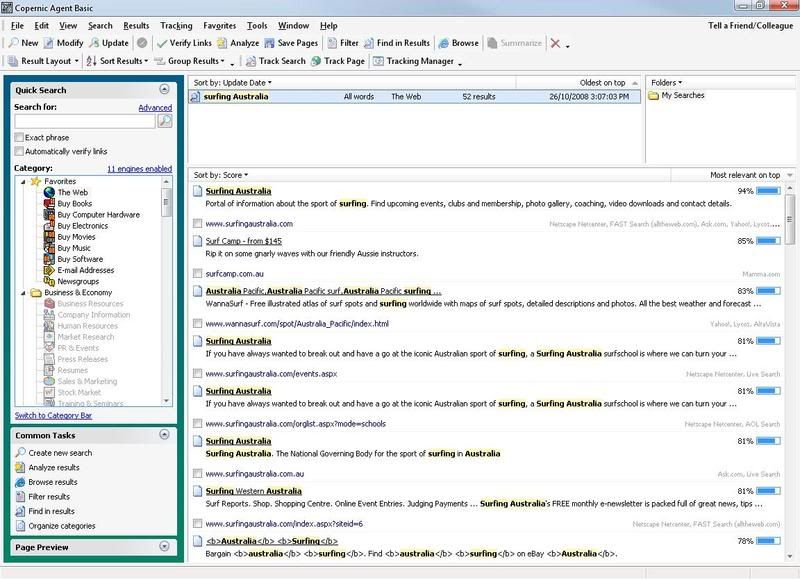
Again i searched for the term "surfing Australia". However this time i was only presented with 56 results. I dont really see the point of using this program as it gives fewer results and the results that were given arent that good. I found that Googles results were a lot better on first glance because they provided not only websites but also a huge archive of images. The first 5 hits here were:
www.surfingaustralia.com/school.aspx?org=450 - 21k - Cached - Similar pages - Note this
Waveski Surfing Australia Home
It is provided by Waveski Surfing Australia Inc., the national association for the sport in Australia and will be regularly updated with stories and news on ...
www.waveskisurfingaust.com/ - 43k - Cached - Similar pages - Note this
2. Using copernicus or similar, set it up to search at least three search engines (including one that will search the 'deep web') and repeat eactly the same search.www.waveskisurfingaust.com/ - 43k - Cached - Similar pages - Note this
Surfing Australia
Surfing in Australia, the best surf spots and areas on the East, South and West Coast.
www.surfing-waves.com/travel/australia.htm - 29k - Cached - Similar pages - Note this
www.surfing-waves.com/travel/australia.htm - 29k - Cached - Similar pages - Note this
Australia Surfing Australia surf travel guide atlas with spot ...
Surfing Australia surfing and travel guide of Australia by GlobalSurfers with surf forecasts and other travel info for surfers.
www.globalsurfers.com/country_details.cfm?land=Australia - 39k - Cached - Similar pages - Note this
www.globalsurfers.com/country_details.cfm?land=Australia - 39k - Cached - Similar pages - Note this
Again i searched for the term "surfing Australia". However this time i was only presented with 56 results. I dont really see the point of using this program as it gives fewer results and the results that were given arent that good. I found that Googles results were a lot better on first glance because they provided not only websites but also a huge archive of images. The first 5 hits here were:

Module 4: Downloading tools / plug-ins Task
1. Adobe pdf reader: This file is extremely important into todays times. There are a lot of files out there now which are in pdf format and this is the only program, to my knowledge, which lets you view pdf files. It is available for free download and very useful.
2. Shockwave/flash player: This program lets you view rich-media files. Shockwave in particular is used a lot in free online mini games. Miniclip.com is a perfect example of shockwave and flash use as most of their content uses these programs. They can also be used to view animations and interective content.
3. windows media player: Windows media player is a really well thoughtout program. I allows users to listen to music, watch videos, steam live video and audio and listen to live raido podcasts. If used in conjunction with DivX you can even watch DVD's in a really nice quality.
4. Pagesucker: Pagesucker seems like a great progam. It allows the user to download files from the web while offline. However the free trial version only lasts for 15 days.
2. Shockwave/flash player: This program lets you view rich-media files. Shockwave in particular is used a lot in free online mini games. Miniclip.com is a perfect example of shockwave and flash use as most of their content uses these programs. They can also be used to view animations and interective content.
3. windows media player: Windows media player is a really well thoughtout program. I allows users to listen to music, watch videos, steam live video and audio and listen to live raido podcasts. If used in conjunction with DivX you can even watch DVD's in a really nice quality.
4. Pagesucker: Pagesucker seems like a great progam. It allows the user to download files from the web while offline. However the free trial version only lasts for 15 days.
Module 3: Web 2.0
There are many differences between the web 2.0 and the html version of the web. It is clearly noticeable that the web 2.0 has bought about some really nice features however they do come at a cost sometimes. The web 2.0 has added such things as formating, layouts, graphical interfaces and a more complex way of using the internet. These features however have forced us to develop faster internet services which are more expensive and which some people can not keep up with.
With the introduction of youtube and myspace, which both stream videos and allow users to upload their own photos, it is becoming increasingly important for users to spend more money on their ISP services. This is one of the major downfalls of the web 2.0.
Html on the other hand is simple and uses up very little resources. Most pages are simple and text based. However html also has a downfall and this is the layout. There is often no clear layout when looking at html pages. This makes them hard to read and unclear at times.
Personally i prefer the web 2.0 and the features it has bought about. The internet would be a pretty boring place if it wasnt for the likes of youtube, myspace and facebook which bring a whole new meaning and a whole new level of networking to the world.
With the introduction of youtube and myspace, which both stream videos and allow users to upload their own photos, it is becoming increasingly important for users to spend more money on their ISP services. This is one of the major downfalls of the web 2.0.
Html on the other hand is simple and uses up very little resources. Most pages are simple and text based. However html also has a downfall and this is the layout. There is often no clear layout when looking at html pages. This makes them hard to read and unclear at times.
Personally i prefer the web 2.0 and the features it has bought about. The internet would be a pretty boring place if it wasnt for the likes of youtube, myspace and facebook which bring a whole new meaning and a whole new level of networking to the world.
Subscribe to:
Comments (Atom)